The FlexMeasures data model
The data model being used in FlexMeasures is visualized here (click for larger version):
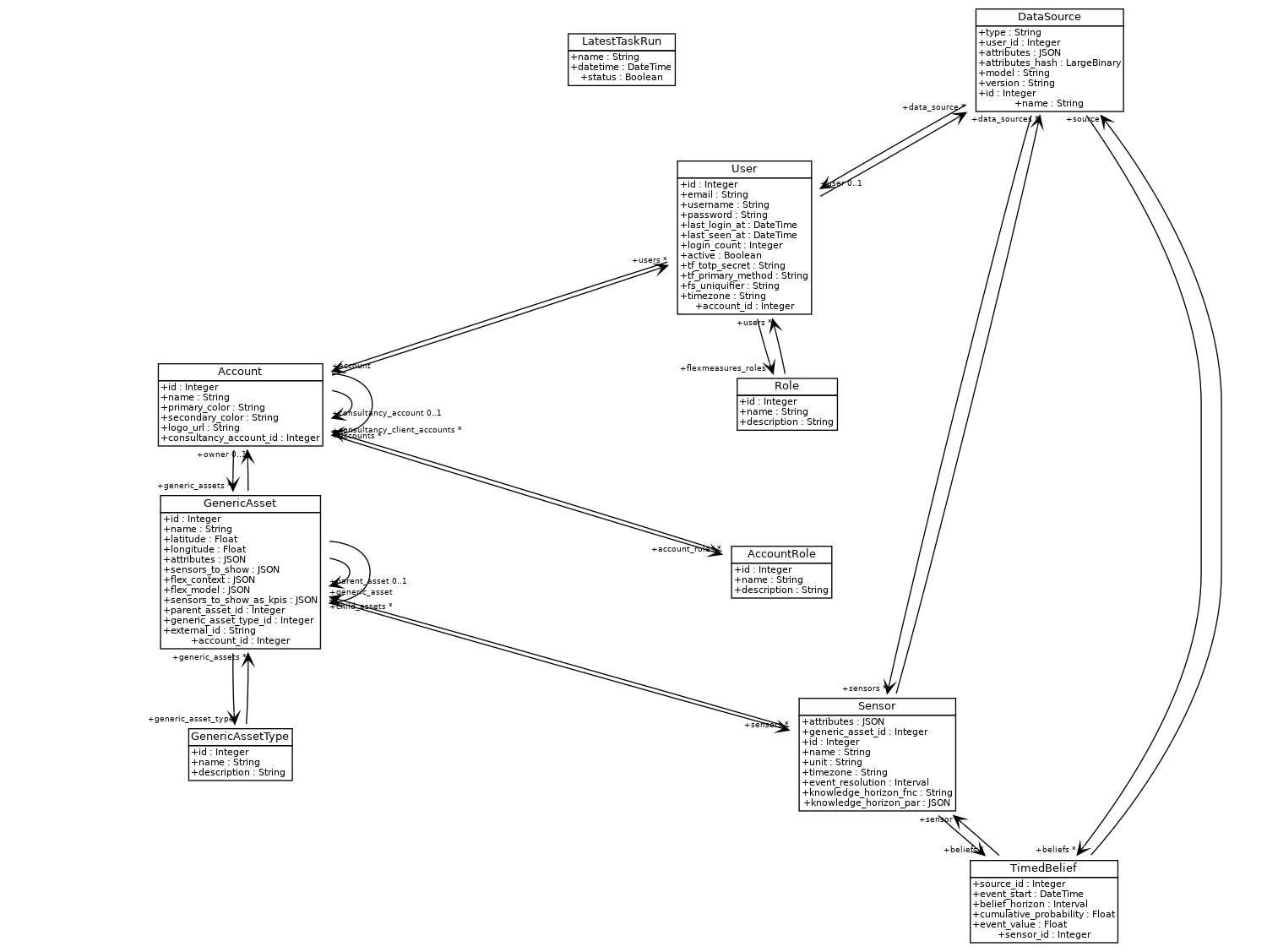
Let’s dive into some of the more crucial model types:
Assets
Assets can represent physical objects (e.g. a car battery or an industrial machine) or “virtual” objects (e.g. a market). In essence, an asset is anything on which you collect data, and therefore many assets have one or more sensors assigned.
Assets can also have a parent-child relationship with other assets. So, you could model a building that contains assets like solar panels, a heat pump and EV chargers.
Here is an example of an asset with sub-assets:
        flowchart TD
    A[Grid] <--> B(Campus)
    B <--> C(Site 1)
    B <--> D(Site 2)

    C <--> E[PV]
    C <--> F[Battery]

    D <--> G[PV]
    D <--> H[Battery]
    D <--> I["Charge<br>Point"]
Asset belong to accounts (read more on accounts below).
Assets are often represented in other systems (e.g. IoT gateways / local EMS) with another ID. To link FlexMeasures’ representation of assets with such external representations, you can store those IDs as external_id.
About asset types
We model asset types explicitly. None are required for running FlexMeasures.
Some asset types have support in the UI (for icons, like a sun for "solar"), and in the toy tutorial and test.
Some are used to select the scheduler (e.g. using "battery" or "one-way_evse" leads to using the storage scheduler).
However, in practice (for now), we default to storage scheduling for everything not typed “process” or “load” (as those would use the process scheduler).
You can add default types (and other useful things like data sources and user roles) by running flexmeasures add initial-structure.
You can add your own types, which is useful for plugin logic (an example is the "weather station" type for a plugin that reads in weather forecasts). The CLI command for this is flexmeasures add asset-type.
Sensors
A sensor depicts how data is collected in detail. Each sensor links to an asset.
For instance, an asset might have both a energy meter and a temperature reading. You’d link two sensors to that asset and each sensor would have a unique unit (e.g. kWh and °C).
You can also tell FlexMeasures in what timezone your data is expected to be set, and what the resolution should be. Then, FlexMeasures can try to convert incoming data to these specifications (e.g. if Fahrenheit readings come in, it converts them to Celsius).
A bit more intricate control is to describe when beliefs (see below) are known. You might get prices from a supplier, but the time you imported them is not the time they were known. A market might have a publication date you want to adhere to. More information in the timely-beliefs documentation.
Data sources
We keep track of where data comes from, for better reporting, graphing and the status page (this is also an aspect of the timely-beliefs package). A data source can be a FlexMeasures user, but also simply a named source from outside, e.g. a third-party API, where weather forecasts are collected from.
In FlexMeasures, data sources have a type. It is just a string which you can freely choose (we do not model them explicitly im the data model like Asset types). We do support some types out of the box: “scheduler”, “forecaster” “reporter”, “demo script” and “user”.
Beliefs
When we discussed sensors, we hinted at the care we took to model the event data well. We call each data point a “belief”, as we not only store measurements ― we also store forecasts, schedules and the like, many of which do not have a 100% truth value.
For instance, a horizon of 0 means the data point was known right after it happened. A positive horizon means the data point is a forecast.
The timely-beliefs package helps us to model many aspects about data points, e.g. who claims to know that value, when they said so and how certain they were.
Each belief links to a sensor and a data source. Here are two examples:
The power sensor of a battery, where we store the schedules, can have two sources: (1) the schedule itself (a data source of type “scheduler”, representing how FlexMeasures created this data) and (2) the realized schedule, i.e. the measurements of how the battery responded (or not) to the schedule. The latter might have a data source of type “user” (who sent the measurements to FlexMeasures).
A thermal demand sensor containing forecasts (data source of type “forecast”, e.g. heating usage forecast sent to FlexMeasures or made by FlexMeasures) and measurements (sent into FlexMeasures, data source type “user”).
About signs of power & energy values
In short: You can use any sign you want for power data. But the scheduler in FlexMeasures needs to know how to apply the signs. Positive (+) means consumption, negative (-) means production. Let us explain.
When beliefs are about power or energy, the sign of the value is important. It indicates whether the asset is consuming or producing. However, there is no universal standard for this. Some systems use positive values for production and negative values for consumption, while others do the opposite.
FlexMeasures doesn’t enforce any perspective (we have a design philosophy of letting users model the system in their own way).
For example, users can create PV power data with positive values indicating production, and they can also create building power data with positive values indicating consumption. We allow this because we want the UI to match what is in the database, and users often desire both of these datasets to be shown as positive values. We assume that this is what users send in.
Note that, if forecasts are created, they will have the same sign as original data.
For schedules, the sign of resulting power data (beliefs) is being switched when data is stored (assuming consumption , and you can prevent that by setting sensor.attributes["consumption_is_positive"] = True.
Note
We will soon document better what the scheduler does in detail, and how the attribute works.
Accounts & Users
FlexMeasures is a multi-tenant system. Each account should model an organization with multiple users.
Accounts “own” assets, and data of these assets are protected against anyone from a different account (unless a user has the admin role).
Accounts can “consult” other accounts. This depicts the real situation that some organizations are the consultants or advisors to many others. They have certain rights, e.g. to read the data of their clients. That is useful for serving them. If you are hosting FlexMeasures, and the organizations you serve with it use this feature, you are effectively running a B2B2B setup :)
Finally, accounts can be white-labelled. Each account can have a logo and a unique set of primary and secondary color. This will determine what users see in the UI when they log in as users of an account.